
The average adult spends over 7 hours a day looking at a screen.
Yeah.
With so much time spent on our computers and phones, with all the things we’re able to do with technology, it’s no wonder our devices get a little (or a lot) cluttered.
Emails, text messages, apps, programs, subscriptions, notes, bookmarks, extensions…
If it’s been a while since you’ve taken stock of the apps, websites, photos, and other clutter on your devices, it might be time for you to digitally declutter.
What is digital decluttering?
Digital decluttering is the process of going through your devices (computer, phone, cloud storage, iPad, Xbox, whatever) and removing the things you don’t need anymore, then organizing what’s left.
Clearing your digital clutter usually involves some sort of:
- Auditing – Going through your devices and online storage spaces
- Purging – Deleting, unsubscribing, or offloading
- Organizing – Let’s be honest, this usually means making folders
It’s honestly very simple! But if it seems like a daunting task, don’t worry. You don’t have to completely declutter everything in one sitting.
Luckily, there are small, practical ways you can start digitally decluttering today.

Why is it important to digitally declutter?
Digital clutter wears down at you, even if you don’t realize it. Your super-awesome brain takes note of all the “open loops” you expose it to, like a screenshot you saved but didn’t take action on yet or an app that you downloaded but never use.
When you open your inbox and there’s 10,000 unread emails, or when you scroll through 200 names in your contact list to find your friend’s phone number, your brain can’t help but feel overwhelmed.
“Do I need to pay attention to this? Do I need to do something about this?” it panics. You may start feeling anxious or bothered, even though you can’t put your finger on why.
In contrast, imagine opening your inbox and it’s completely cleared out.
Or unlocking your phone, and the home page only has 3 apps–ones that you actually use daily.
Your brain can breathe a sigh of relief, and start using its energy on more important things.
Practical ways to digitally declutter
Go through your subscriptions. Keep the ones that you need for work and the ones you use regularly. If you haven’t used a service in over a month, cancel it. You can always sign up for it again later.
Delete the apps on your phone that are offloaded. Apps that have a small cloud icon next to them are offloaded. Your phone typically does this automatically to clear up storage space. If it’s offloaded, that means you don’t use them often enough to keep. (Remember, you can always re-download these apps if and when the need arises.)
Mute everyone on social media that you’re not excited to see an update from. You should feel excitement. If you feel anxiety, negative judgment, or indifference, mute them or unfollow.
Close unnecessary tabs. If you’re like me and have tabs open on your phone or laptop from months and months ago, close them. Try to get in the habit of only having 1 or 2 tabs open at once.
Clear out your bookmarked pages and unbookmark the ones you don’t need anymore.
Delete photos on your phone you don’t need – duplicates, screenshots, pocket photos.
Clean up your contacts list. Go through your contacts list on your phone and delete the people who you don’t talk to anymore. (I admit, when I got around to doing this, I was deleting the contact information for people who I didn’t even remember who they were!)
Unsubscribe from company promotional emails and creator newsletters that you don’t read.
Delete games from your phone. You can always redownload a certain game if you feel like playing it.
Delete old notes in your Notes app. If I didn’t clean out my Notes app, I’d still have shopping lists from 2018.
Use a password manager to keep all your passwords in one place. This is so you don’t have to remember all your passwords (that takes up valuable brain space!).
Clear items from your shopping cart that don’t need to be there. If you need to buy it, buy it. If you’re just dreaming, clear it out of your cart.
Turn off notifications for news outlets. If you don’t, you will be bombarded with all sorts of news stories, some of which will be important and you’ll care about, many of which will be Buzzfeed articles or fake news you don’t need to be notified about.
Tackle that email inbox. You can mass delete emails according to who sent them, if they’re read or unread, or by date. Try to get your unread emails down to 0 (or less than 20).
Clear out your promotions tab. Delete all of the emails that are labeled “Promotions,” because those pile up really fast.
Delete text message conversations from more than a year ago. You can do this manually or set your phone to do it automatically.
- For iPhone: Settings > Messages > Keep Messages and select “1 Year”
- For Android: Settings > More Settings > Delete old messages
Organize your apps into folders, like Communication, Social, and Fun.
Clear out old voicemails.
Organize your downloads folder. Delete things you don’t need anymore, and move things you want to save into folders with clear categories.
Rename messy files with clear names. I sometimes come across old files called “thing.doc” or “09Y7L43.pdf” and I have no idea what they are. Go through those files and either delete them or give them a clear name and folder.
Empty your trash/recycle bin. That just feels good to do.
Back up your computer. You can do this by copying important data over to a physical external hard drive or an online storage space.
Clear your browser cache. This removes saved data from websites you’ve visited in the past, and it will speed up your computer and free up storage space. There’s a super easy shortcut to do this: Ctrl+Shift+Delete.
Clear saved passwords you don’t need. If you use a password manager, periodically go through and remove passwords for websites you don’t use anymore.
Remove old shared files in your online storage cloud. Whether you use Google Drive, Dropbox, OneDrive, or all of those, you probably have some reallllly old, unnecessary files there.
Delete duplicate files in the cloud. In addition to unnecessary files in your storage cloud, you probably have some duplicates in there too, taking up space.
Organize your online photos into albums. The simplest way to do this (though not the only way) is to organize by year or month.
Turn off autoplay. This is one of my favorites. If you use a streaming service, see if you can turn off autoplay in the parental controls setting.
Remove files and unnecessary icons on your desktop home screen. Just enjoy that sunset wallpaper, instead of being hit with a hundred icons.
This is by no means a comprehensive list, but these steps should get you off to a nice start!
Again, don’t feel like you have to tackle all these tasks or all your devices at once.
My suggestion? Do it at a pace that isn’t too overwhelming, and find a way to make it fun.
How can I make digital decluttering fun?
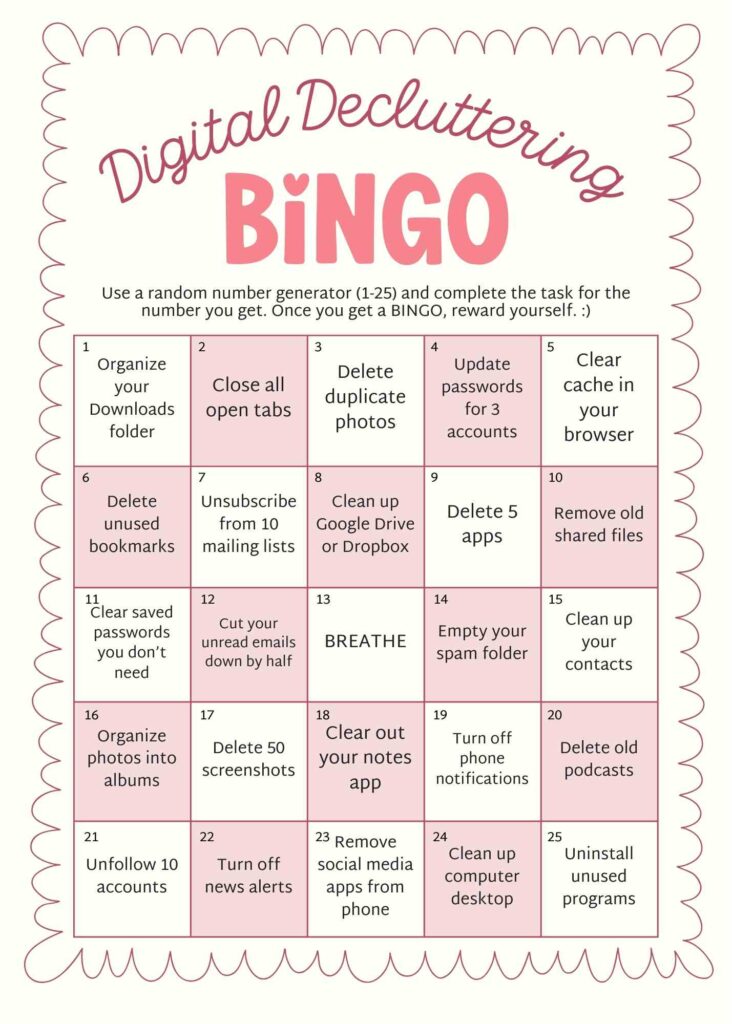
Play Digital Decluttering Bingo
I made a card for you to get started. Each of the task has a number from 1-25, so you can use a random number generator to select which task you work on. When you get 5 in a row, take a break and reward yourself!
Do it with a friend
Sit side by side and clear out your inboxes, old photos, or phone apps together. Feel free to consult with each other (“Should I delete Jeff’s number? We never talk anymore.”) or tease each other about the silly photos you’ve saved.
Declutter while watching TV
If you’re resisting clearing out that digital clutter, go ahead and put on your favorite TV show while you do it. I’ve always believed that you can be productive while watching something.
Recommended article: Productive Things You Can Do While Watching TV
Final thoughts
Digital decluttering is one of the ways you can make sure you are in control of your technology, not the other way around.
Clearing out your devices and digital storage spaces is bound to leave you feeling less stressed, bothered, and overwhelmed.
Give it a try and see what a difference it makes!
Best of luck!

Before You Go…
Feeling great after digitally decluttering? Do some mental decluttering next.
Not loving being on a screen for 7 hours a day? Here’s how to use technology more mindfully.